A simpler way to manage your school

One school.
One platform.
Everything in sync.

Bring students, teachers, attendance and fees together. A simple School Management ERP that keeps your everyday operations organised—and everyone informed.

Teacher & student modulesFees & attendance
ATS
Built for admins, teachers and students.
SANJAY PRATAP · SCHOOL ERP
Laptop · Attendance overview
Tablet · Monthly register
Mobile · Selfie punch
✓
Attendance, on every screen.Laptop · Tablet · Mobile
Less paperwork. More clarity.

Every school day,
better organised.

From the first attendance mark to the last fee update, bring your essential school processes into one clear view.

01
PEOPLE & RECORDS

People, in one place.

A clear home for teacher and student information.

  • Dedicated teacher & student modules
  • Complete student details in one register
  • Clear class teacher allocation
Explore all modules
02
ATTENDANCE & TIMINGS

Every day, accounted for.

Daily marking that follows your school schedule.

  • Attendance shifts and school timings
  • Holidays and weekly off settings
  • Teacher & student monthly registers
View attendance dashboard
03
FEES & REPORTS

Fees, clearly visible.

Know what is paid and what is still pending.

  • Centralised fees management
  • Student-wise pending fee details
  • Fee reports inside student login
Explore student portal
Your school at a glance

A clear view. Every single day.

Explore your ERP interface—from teacher selfie attendance to student records, monthly registers and school calendars.

SCHOOL MANAGEMENT ERP / ENHANCED PREVIEW

High-resolution recreations based on your School ERP screenshots. Contact details are dummy. Select a module or click an image to inspect it.

Explore the interactive layout demo · Sample data
School OverviewIllustrative demo · Sample data

Student attendance this week

Class-wide attendance · Illustrative data

Mon
Tue
Wed
Thu
Fri
Sat

Teacher timing alerts

Morning shift · 08:00 AM – 02:00 PM

Late comingArrival after the shift start
03
Early goingDeparture before shift end
02

Interactive design preview. Figures and student names shown here are illustrative.

Your dashboard, on every screen

Your school ERP.
Framed for every device.

Explore your teacher, attendance and student screens in laptop, tablet and mobile frames.
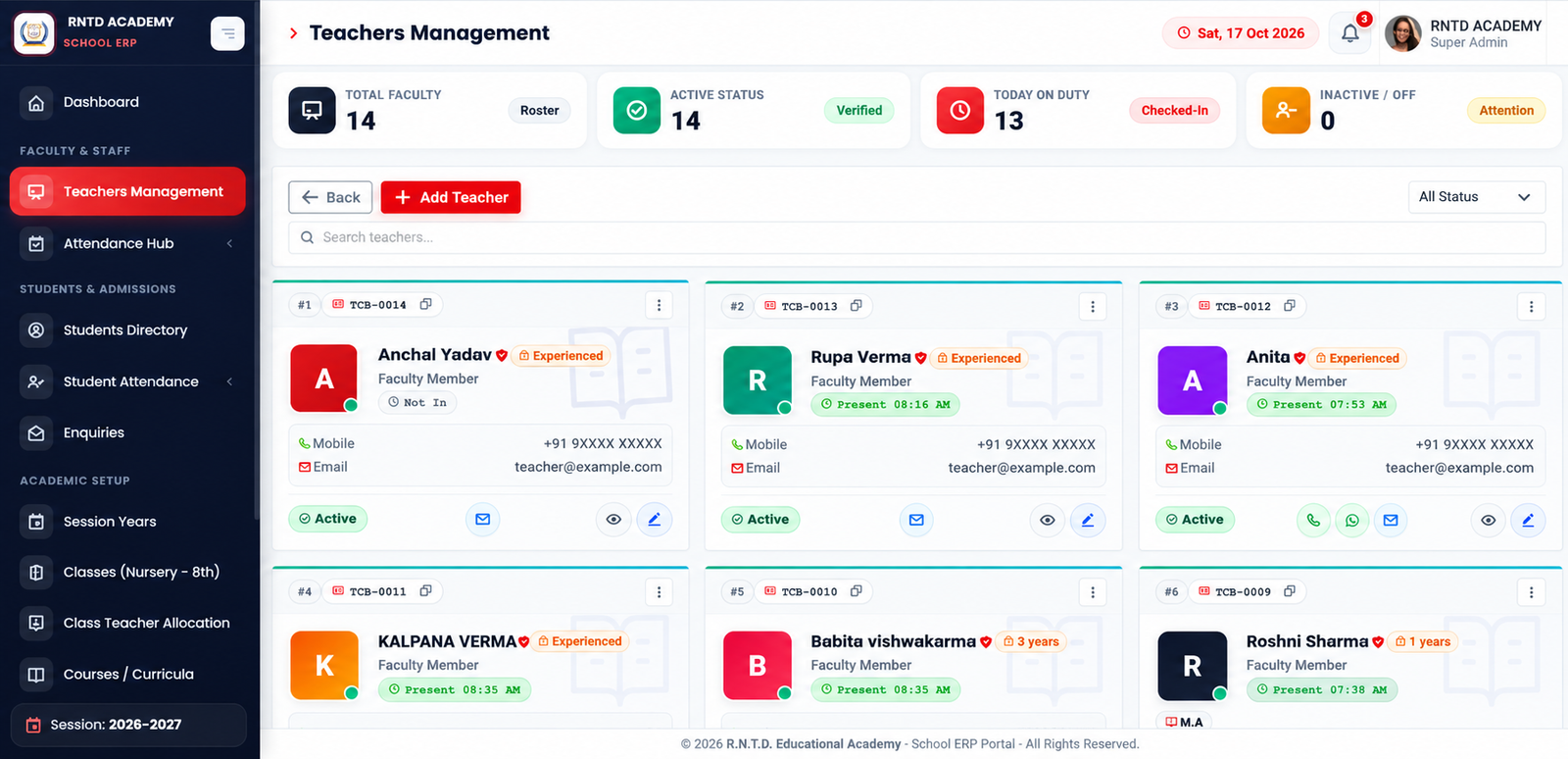
Teachers Management
Recreated teacher management screenshot inside laptop preview
Teachers Management

Teacher profiles, active status and on-duty updates, together on your laptop.

Laptop frame · Recreated ERP screen with dummy contacts

These previews use your supplied desktop screenshots. Select View Full Screen to see the complete image fitted to your screen.

Teacher Selfie AttendanceMobile selfie punch-in · Teacher attendance
Feature illustration
Teacher attendance with selfie

Selfie attendance.
Clear timings. Less effort.

Keep teacher check-in, check-out and selfie records together in one organised attendance view.

✓ Selfie check-in / out✓ Late-coming alerts✓ Early-going alerts✓ Monthly register
Explore the attendance dashboard →
View teacher attendance screen Actual interface preview
Enhanced attendance preview

Selfie records. In-time. Out-time.

See the attendance roster and teacher selfie records directly in your ERP interface.

Try selfie attendance Interactive demo
Interactive UI demo

Teacher Selfie Attendance

Priya Verma · Morning shift · 08:00–14:00

Add a selfie to try the preview

Demo only. Your photo stays in this browser; no attendance is submitted.
Inside your School ERP

Clear screens.
Everyday school clarity.

Take a closer look at the tools your school uses to organise people, attendance and schedules.

Scroll right to explore all screens
1 / 9

Teachers Management

Review teacher profiles, active status, on-duty updates and contact details in a clear card view.

Student Directory

Browse student cards with class, guardian details, contact options and fee collection access.

Monthly Faculty Register

Review the day-wise monthly attendance matrix, late arrivals, leaves and absences.

Attendance Shift Timings

Organise monthly in-time and out-time schedules for teachers, staff and students.

Holidays & Weekly Off

View the holiday roster, Sunday weekly off, upcoming school breaks and academic calendar.

Student Daily Report

Class-wise student attendance, daily marking access and monthly register overview.

Class Teacher Allocation

Map primary and secondary teachers to classes and review proxy assignments for absent days.

Academic Sessions

Review academic years, start and end dates, active session status and historical records.

Classes & Sections Directory

Organise classes by wing, review enrolments and see session and active status in one directory.

Click any screenshot for a full-size view. Recreated interface previews use dummy contact details.

Everything your school needs

13 essentials.
A complete view of your school.

From teacher check-in to student progress, every module brings more clarity to your everyday school work.

One login. The complete picture.

Every student detail.
Together in one portal.

Bring personal information, pending fees, test performance and academic growth into one clear student view.

  • Student and guardian details
  • Paid fees and pending balance
  • Subject-wise test report
  • Progress across successive tests
Explore the Student Portal ↗

Design preview with illustrative student and academic data.

STUDENT PORTALIllustrative profile

Aarav Sharma

STU-2026-041 · Roll No. 21

Class VIII · ASession 2026–27
Attendance96%Regular attendance
Latest test score88%Grade A
Academic growth+16 ptsSince Test 1
♙

Student details

GuardianRakesh Sharma
Class teacherPriya Verma
Class & sectionVIII · A
Student status● Active
₹

Fees overview

Pending
OUTSTANDING BALANCE
₹2,500

October · Academic session 2026–27

Paid ₹12,500Total ₹15,000
▤

Test report

Test 3
GRADE A

Strong performance

264 / 300 total marks
Mathematics92 / 100
Science88 / 100
English84 / 100
↗

Growth report

Steady progress↑ 16 pts

Overall scores across three tests

72%80%88%Test 1Test 2Test 3
✓Improvement in every test
Sample student profile, fees and academic results · Design preview
Built around your day

At your desk.
On the move.
Always within reach.

Use your School Management ERP on mobile, laptop or tablet. A consistent, responsive experience for everyday school work.

▯   Mobile▱   Laptop▣   Tablet
A more organised school calendar

Right timing. Clear registers.

Set attendance shift timings, account for holidays and weekly offs, and keep teacher and student monthly registers together.

01 Define your attendance shifts
02 Organise holidays and weekly offs
03 Review daily and monthly records
Let's get started

A simple path to a simpler school.

01

Tell us about your school

Share your classes, teacher structure, fee process and attendance needs.

02

Explore a personal demo

Walk through the modules and see how they fit into your daily operations.

03

Plan your school setup

Discuss your requirements with Sanjay Pratap and agree on the next steps.

A LITTLE HONESTY

Please don't choose our
School Management ERP…

Unless you're ready for clearer records, attendance and fees.
Swipe to know why →

A little humour. A real school challenge.
1 / 4
Have questions?

Let's make things clear.

What does the School Management ERP include?

It includes teacher and student modules, fees, daily student marking, student registers, teacher and student monthly registers, class teacher allocation, attendance shifts, holidays, weekly offs and student login with reports and pending fees.

Can I use the system on a phone or tablet?

Yes. The ERP supports use on mobile, laptop and tablet. Ask for a demo to see the experience on your preferred device.

What can students see in their login?

The portal design brings student details, pending fees, subject-wise test reports and growth reports together. Academic examples on this page use illustrative data.

Can attendance follow our school shift timings?

The system includes attendance shift timings, holidays and weekly offs, along with daily marking and monthly registers.

How do I see the actual ERP or discuss pricing?

Contact Sanjay Pratap on 8576086726 or email sjypratap@gmail.com for a walkthrough and a discussion of your school's requirements and pricing.

LET’S CONNECT

A better school day
starts with a conversation.

Tell us what your school needs. Let’s explore a simpler way to manage teachers, students, attendance and fees.

SP
Your School ERP partner

Sanjay Pratap

How can we help
your school?

Explore the modules, see the dashboard in action, or discuss your school’s requirements.

One connected solution. Built around your school.
SEE IT IN ACTION

Let’s book your demo.

A quick walkthrough of the tools your school needs, all in one place.

Your details open in WhatsApp. Review the message and tap Send to share your request.
⌃